When a machine evolves from a few simple movements to more than ten servo axes, dozens of I/O modules, and a large number of EtherNet/IP devices, controller selection is no longer just about comparing memory size. Engineers also need to consider motion capacity, network scale, future expansion, the continued usability of existing I/O, and the ease of future maintenance.
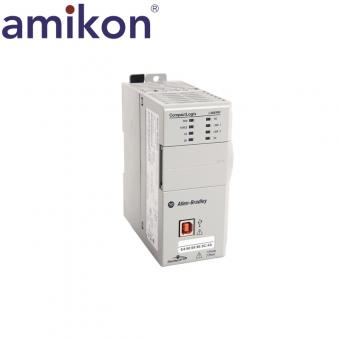
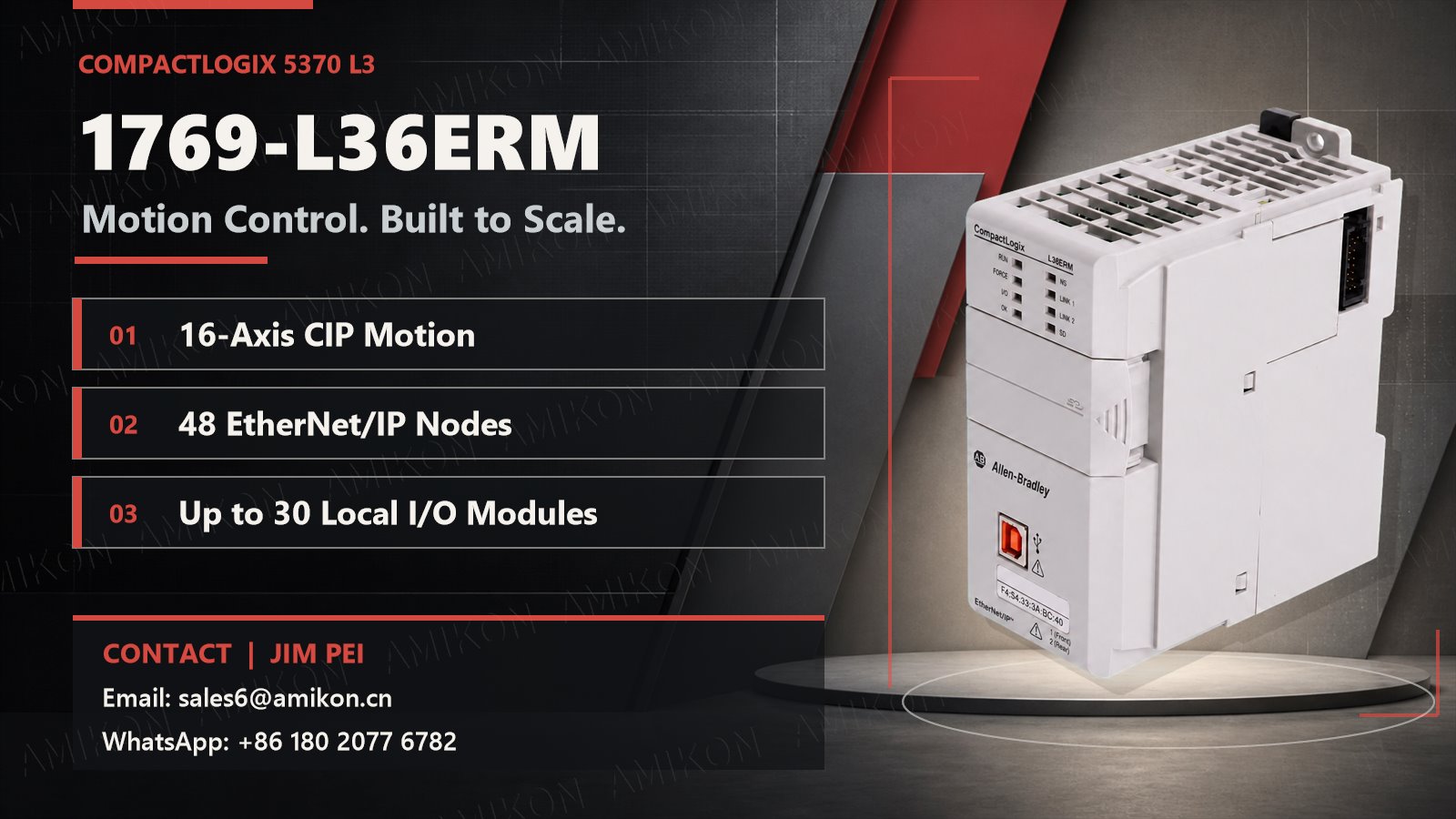
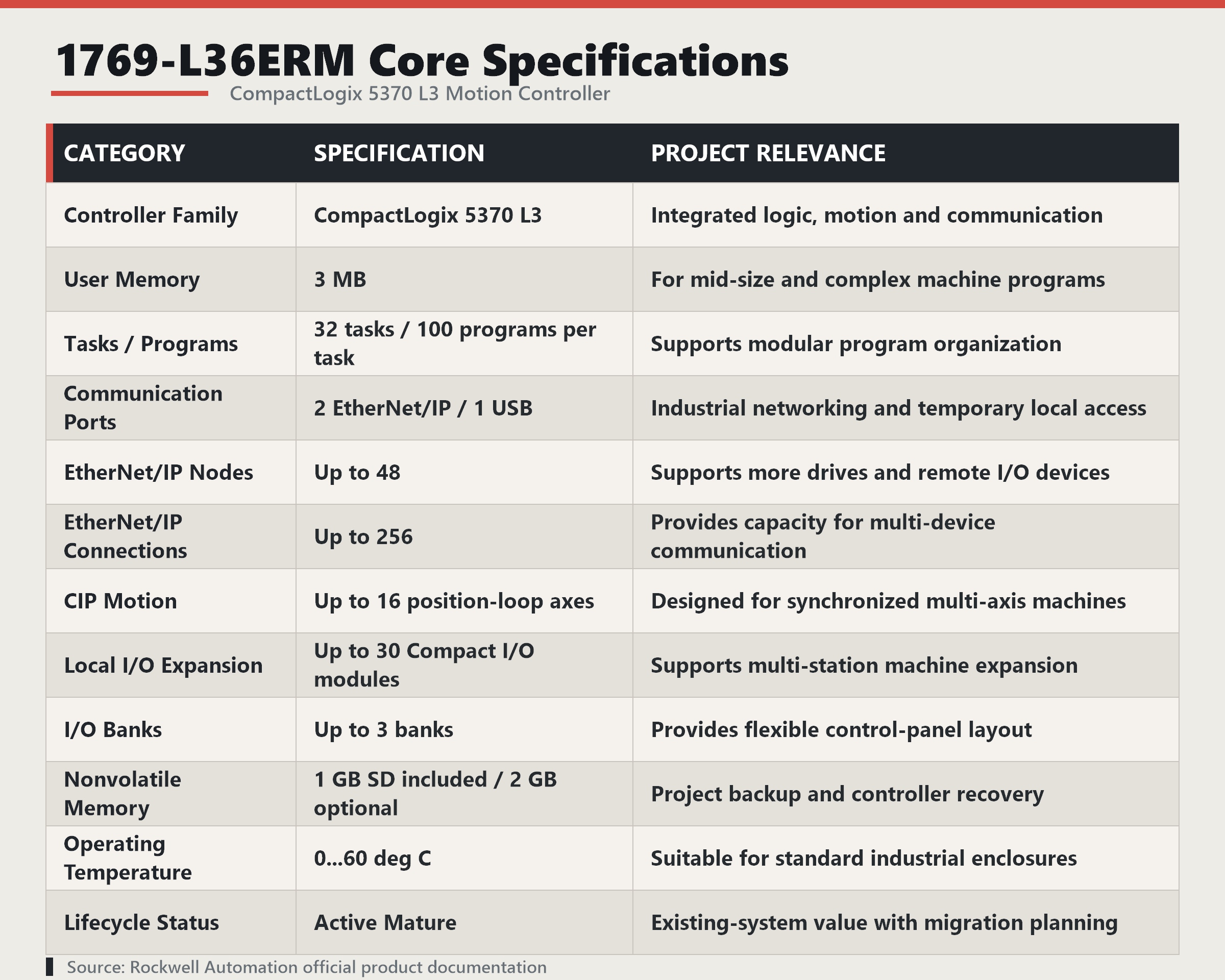
The Allen-Bradley 1769-L36ERM is a CompactLogix 5370 L3 motion controller that provides 3 MB of user memory, dual EtherNet/IP ports, up to 16 CIP motion position loop axes, 48 EtherNet/IP nodes, and 30 local 1769 Compact I/O modules. It is more suitable for medium to large-sized machines that have exceeded the capacity of a small PLC but do not require a large control system.
Which projects should consider the 1769-L36ERM?
The 1769-L36ERM is generally worth considering if the project meets the following criteria:
- The equipment needs to control 8 or more, up to 16 CIP motion position loop axes;
- The 16 local I/O modules are insufficient for expansion needs;
- The number of EtherNet/IP nodes is approaching or exceeding 32;
- Logic, motion, and equipment communication need to be handled within a single platform;
- The existing production line already uses 1769 Compact I/O;
- Future additions of workstations, drives, detection, or barcode scanners are possible.
If the equipment has only a small number of motion axes and I/O, the 1769-L33ERM may be sufficient; if the program, data, and network scale are larger, the 1769-L37ERM or a newer generation control platform should be evaluated.
Key Technical Features and Practical Value
Integrated Logic and Motion Control
The 1769-L36ERM supports up to 16 CIP motion position loop axes and kinematic functions. Device logic, motion commands, axis states, and interlock conditions can all be managed within a single Studio 5000 project.
For machine manufacturers, this helps reduce the need for separate motion controllers and their communication interfaces; for commissioning engineers, it makes it easier to troubleshoot from program conditions, axis states, and field I/O.
Dual EtherNet/IP Ports and DLR Capability
Two EtherNet/IP ports are part of the controller's internal switching structure and share a single IP address, usable in linear networks or DLR device-level ring networks.
Linear structures simplify wiring between devices; with proper DLR configuration, they help reduce the risk of a single link failure causing a complete network communication outage. Note that related devices in the network must also support DLR.
30 Local 1769 I/O Modules
The L36ERM supports up to 30 local 1769 Compact I/O modules, distributed across up to three module groups. For multi-station equipment, this means the control system can connect to more sensors, valve islands, analog inputs, and dedicated modules.
For legacy equipment already using the 1769 I/O architecture, continuing to use the same I/O system may reduce rewiring and cabinet modifications, but module version, power supply, and firmware compatibility must be verified.
Open Communication and Peripheral Integration
Rockwell Automation's official product introduction states that the CompactLogix 5370 L3 features open socket communication capabilities, supporting Modbus TCP devices as well as peripherals such as barcode readers, printers, and servers.
This provides the foundation for barcode scanning, label printing, recipe exchange, and production data transmission, but specific protocols, data formats, and exception handling still need to be correctly implemented in the project.
What value can it bring to different industries?
Packaging, Filling, and Labeling Machinery
Packaging equipment often requires synchronized feeding, conveying, sealing, labeling, and discharging axes. The L36ERM's 16-axis CIP motion capability can coordinate these actions within a single platform.
Its value is not simply increasing the number of servos, but rather enabling motion control and equipment logic to operate within the same project. Engineers can directly debug based on sensor status, axis position, and equipment interlocks, reducing data exchange between different controllers.
Automated Assembly and Inspection Equipment
Assembly lines often add workstations, visual inspection, barcode scanning, or quality tracking functions later in the process. The L36ERM's 30 local I/O modules and 48 EtherNet/IP nodes provide more space for such expansions.
For equipment manufacturers, this reduces the likelihood of controllers reaching their capacity limits prematurely; for end-factories, it facilitates the later addition of inspection and automation functions.
Conveying, Sorting, and Material Handling
These systems typically include a large number of distributed I/Os, frequency converters, barcode scanners, and operator terminals. Dual EtherNet/IP ports enable the equipment to use linear or ring networks, reducing complex point-to-point communication.
DLR does not replace a complete network design, but when equipment is compatible and configured correctly, it can improve the network's resilience to single-link failures.
Existing Production Line Retrofitting
For equipment already using the 1769 Compact I/O, the greatest value of the L36ERM may not be performance, but rather the retention of some existing I/O, wiring, and engineering experience.
However, identical interfaces do not guarantee direct replacement. Before retrofitting, the original controller model, Series, firmware, Studio 5000 version, I/O configuration, power supply capacity, network address, and SD card settings must be confirmed.
How to choose between L33ERM and L37ERM?
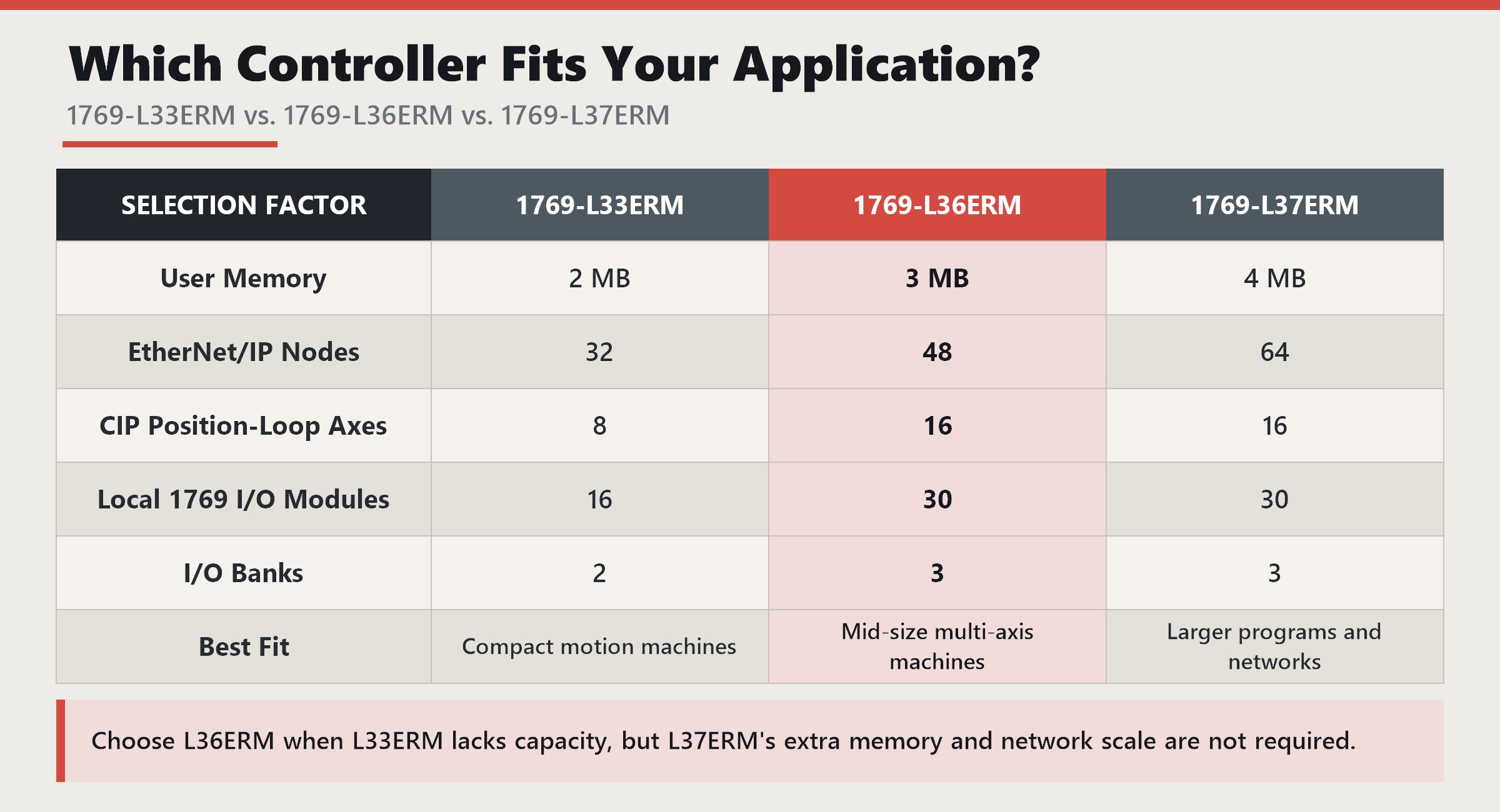
Compared to the L33ERM, the L36ERM increases the number of motion axes from 8 to 16 and the number of local I/O modules from 16 to 30, making it more suitable for multi-axis and multi-station machinery.
Compared to the L37ERM, the L36ERM retains the capability of 16 axes and 30 I/O modules, but has fewer memory and network nodes. Therefore, when the project does not require 4 MB of memory or 64 network nodes, the L36ERM is often a more balanced choice in terms of capacity.
Installation and Operation Optimization Recommendations
The 1769-L36ERM should be installed on the far left of the local module group, and an end cap must be installed on the right side of the last module. Approximately 50 mm of ventilation space should be maintained above, below, and on both sides of the controller and I/O system. For multi-module systems, proper extension cables should be used, and the current consumption and power distance rating of all modules should be calculated.
I/O update speed is not always better the faster it is. Rockwell Automation technical data provides the following references:
- 1–2 general I/O modules: 0.5 ms RPI;
- 3–4 general I/O modules: 1 ms;
- 5–30 general I/O modules: 2 ms;
- When using communication or high-speed dedicated modules, further increases in RPI are required.
Inappropriate RPI may cause overlapping I/O tasks and additional communication load.
After commissioning, the project, firmware version, IP address, I/O list, and SD card backup should be saved. Before upgrading the firmware, ensure the SD card is set to automatically load upon power-on; otherwise, older programs or firmware on the card may overwrite the newer version on the controller.
Lifecycle and Procurement Recommendations
Rockwell Automation currently marks the 1769-L36ERM as "Active Mature" and indicates available alternatives. This does not mean the product is immediately unusable, but procurement personnel need to consider future supply, spare parts, and upgrade routes.
For existing CompactLogix 5370 production lines, continuing to use the L36ERM maintains platform consistency. For new projects expected to operate for more than ten years, the next generation controller should be compared simultaneously, not just the current procurement cost.
When purchasing, it is recommended to verify:
- Complete product model and Series;
- Product label and serial number;
- Current firmware version;
- Whether an SD card is included;
- Packaging and product condition;
- Source and after-sales terms;
- Compatibility with existing projects and I/O modules.
Conclusion
The core value of the 1769-L36ERM is not just its 3 MB of memory, but its integration of multi-axis motion, device logic, local I/O, and EtherNet/IP communication into a single CompactLogix platform.
It is particularly suitable for packaging machinery, assembly equipment, material handling systems, and retrofitting projects on older production lines that require more than eight motion axes, a large number of 1769 I/Os, or a significant number of EtherNet/IP devices.
A truly rational selection should consider current needs, expansion capabilities, and project lifespan. For smaller equipment sizes, the L33ERM may be more economical; for larger programs and networks, the L37ERM or a newer platform should be evaluated.
FAQ
1. How to choose between the 1769-L36ERM and the 1769-L33ERM?
If the project has no more than eight CIP position ring axes, 32 EtherNet/IP nodes, and 16 1769 I/O modules, the L33ERM may be sufficient. For capacities exceeding these, the L36ERM should be further evaluated.
2. What is the difference between the 1769-L36ERM and 1769-L36ERMS?
The L36ERM is a standard motion controller, while the L36ERMS is a Compact GuardLogix model with safety features. They are not interchangeable simply because they are similar in appearance and memory.
3. Can existing 1769 Compact I/O be used?
The controller supports 1769 Compact I/O, but the module model, Series, firmware, power capacity, distance rating, and project compatibility need to be verified.
4. Are 48 EtherNet/IP nodes equivalent to 48 network devices?
Not entirely. The node limitation primarily applies to EtherNet/IP devices added to the controller's I/O configuration. Some computers, HMIs, MSG objects, and socket communication devices may use different counting methods.
5. What should be considered when purchasing Active Mature products?
The key evaluation factors should be the supply cycle, spare parts plan, project lifespan, and future migration path. The selection logic for existing system maintenance differs from that for entirely new projects.
6. How to troubleshoot when the I/O light is flashing green or the OK light is flashing red?
A flashing green I/O light typically indicates that one or more configured devices are not responding. Check the module power supply, slots, network, IP address, and electronic keying. A flashing red OK light may be related to firmware updates or a major recoverable fault; first, read the controller fault log.
Contact Us
Manager: Jim Pei
Email:sales6@amikon.cn
Whatsapp: +8618020776782
Recommended Products
|
330101-00-08-10-02-00 |
330525-CN |
6ES5-431451464 |
|
330101-00-08-20-12-05 |
106765-01 |
TSXDET824 |
|
330101-00-10-10-02-cn |
106765-07 |
TSXP47405 |
|
330101-00-12-10-02-00 |
40113-02 |
TSXDET1612 |
|
330101-00-19-10-02-00 |
21505-00-12-10-02 |
6ES5700-8MA11 |
|
330101-00-20-10-02-CN |
21508-02-12-05-02 |
1746-OV8 |
|
330101-00-20-50-02-CN |
105839-02-12-05-02 |
1746-P1 220VAC 2A |
|
330101-00-30-10-02-00 |
21508-02-12-10-02 |
1746-A4 |
|
330101-00-32-05-02-00 |
21508-02-12-50-02 |
IC609SJR100C |
|
330101-00-36-10-01-00 |
21747-045-00 |
1336F-BRF100-AA-EN |
|
330101-00-40-10-02-00 |
21747-045-01 |
6ES7323-1BH00-0AA0 |
|
330101-00-40-10-02-00 |
21747-080-00 |
6ES7334-0CE00-0AA0 |
|
330101-00-52-10-02-CN |
21747-085-00 |
6ES7321-1BH00-0AA0 |
|
330101-00-60-10-01-00 |
18745-04 |
6ED1052-1CA00-0BA0 |
|
330101-00-63-20-12-05 |
330130-040-00-00 |
NB2W90R-11 |
|
330101-00-96-10-02-CN |
330130-040-00-CN |
KOYO TRD-J30-SW |
|
330102-00-20-10-02-00 |
330130-040-01-00 |
KEB F4 16.F4 F1G-4I00 |
|
330102-00-24-10-02-00 |
330130-040-02-00 |
ACS140 ACS143-4K1-3 |
|
330103-00-03-10-02-00 |
330130-040-03-00 |
KOYO KOSTAC |
|
330103-00-03-10-12-00 |
330130-040-11-00 |
Keyenec KZ-16R |
Supplyed
525011

parts to
23253

customers in
148

countries



Disclaimer:
Amikon sells new and surplus products and develops channels for purchasing such products. This website has not been approved or recognized by any of the listed manufacturers or trademarks.
Amikon is not an authorized distributor, dealer, or representative of the products displayed on this website. All product names, trademarks, brands, and logos used on this website are the property of their respective owners. The description, explanation, or sale of products with these names, trademarks, brands, and logos is for identification purposes only and is not intended to indicate any association with or authorization from any rights holder.
Powered by amikonplc.com